X

Imtra Learning Center

Imtra’s Learning Center is a great resource for everything you need to know about your boat’s equipment and systems. Everything from product overviews, product comparisons, buying guides, troubleshooting guides, maintenance tips and more can be found here, and it’s always being updated. Be sure to also check out our video library for product demonstrations, how-tos, webinars and much more!


Imtra Learning Center

Zipwake Offseason Maintenance Tips

Zipwake Offseason Maintenance Tips

Author: Conrad Taylor/Friday, January 16, 2026/Categories: Trim Control- Zipwake

Rate this article:
5.0

More and more boats are being outfitted with Zipwake Interceptors at the OEM level, and older boats are being upgraded as boat owners discover the many benefits vs traditional trim tabs. So what should Zipwake owners be doing in the off season to make sure their system is ready to go when the boat splashes in the Spring? Below are the steps that should be part of your regular off-season maintenance routine:

Clean & Inspect the Interceptors

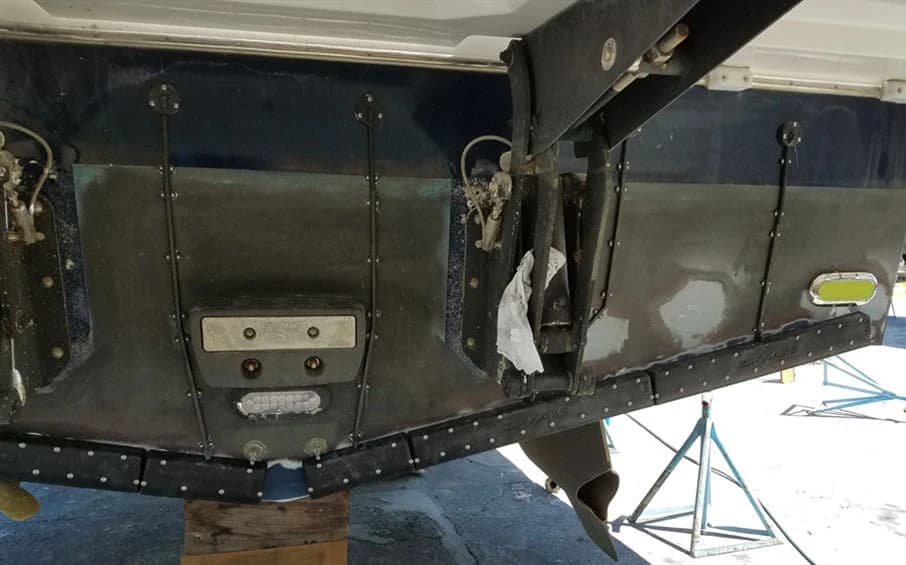
  • Back out the exposed front cover fasteners and remove the outer covers. To avoid deforming the screw heads, take a moment to pick out any excess paint which has filled the Torx drive pockets. 

  • Thoroughly clean the inside of each cover and back plate to remove any marine growth or sediment. This can be done with a power washer or nylon brush and water. A putty knife may be needed to remove any calcified material or barnacles. 

  • Check that the blade moves freely and easily up & down and closely examine the gear cogs for any worn or missing teeth. 

  • Remove any visible excess adhesive around the cable feed-thru or back plate faster heads as this can interfere with moving parts. 

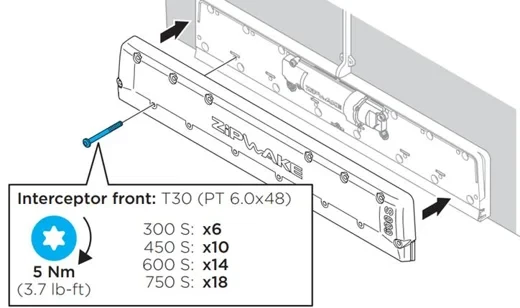
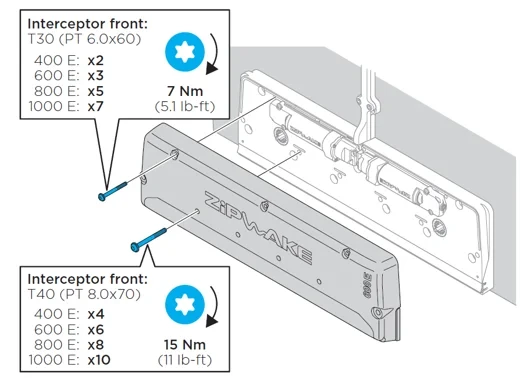
  • With blade in retracted position, carefully place cover back over the back plate and secure with original Torx fasteners. IMPORTANT: Always use a torque wrench and tighten screws to spec:  Please refer to the Series S and Series E installation manuals for proper torque settings or refer to the illustrations below.  Exceeding these limits will impede blade movement and likely result in premature motor failure. Low torque “bicycle” torque wrenches are available through Amazon. For convenience, Imtra sells a small very easy to use torque wrench CLICK HERE.   

Series S

Series E

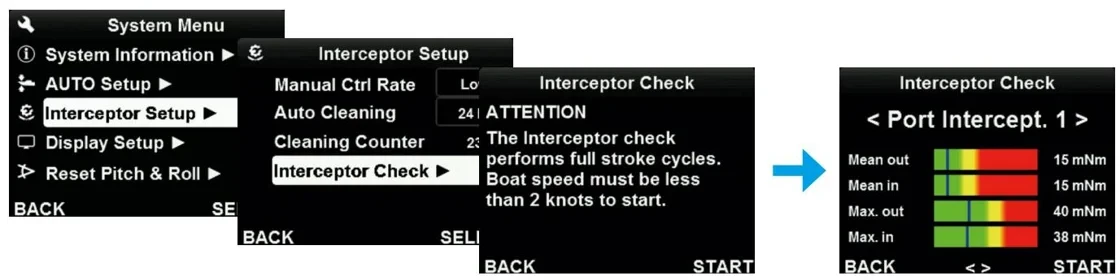
Perform Interceptor Check

Perform an interceptor check at the control panel to assure the interceptors are functioning properly. Look for the blue line to be anywhere inside the green zone. If not, then re-check torque settings. If good, then using a straight edge, check mounting surface for flatness. Surfaces with greater than 2mm variation will cause flex and added friction to blade movement. 

If batteries have been disconnected and stored, then this step needs to be done during Spring commissioning prior to the boat going back in the water. 

Anti-Foul

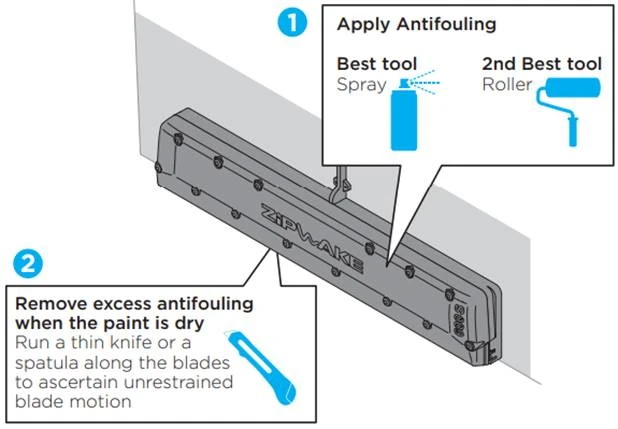
With blades retracted, treat the interceptors with anti-fouling  paint being careful not to get any paint inside the blade opening or anywhere on the face of the blade. Leave the blades untreated. 

Check for Software Update

  • Turn on control panel. Under System Menu, go to System Information and check which Program Version under Main Bridge Panel.   

  • Go to the Zipwake website HERE and click on the Support Page to see if there is a newer Software version available. There will be one for Series S and one for Series E. 

  • Download the software file and copy to a clean USB thumb drive. 

  • With control panel OFF, remove the USB connector cover (rear of panel) and insert the memory stick. 

  • Turn control Panel ON and simply follow the prompts. 

  • CLICK HERE to watch a short tutorial on upgrading your software 


Print

Number of views (4)/Comments (0)

Please login or register to post comments.

Related Articles